
Most online collaboration tools these days come with a hefty price tag for a few features.
But when you run a small business with budgetary constraints, you hope to get the best tool for your team without spending big bucks.
Here’s the big question.
Why pay a hefty amount when you can get online collaboration tools for free?
In this blog, we share with you the top 8 online collaboration tools for your team that offer the best free plans with great features.
But before we jump into that, let’s first see what features make an online collaboration tool the best.
Must-have features of a great collaboration app
You know that buying stand-alone apps isn’t an effective option. Especially when you need to multitask.
A great collaboration app must make your team efficient and help them complete the work on time.
We know what you’re thinking.
How can you differentiate between a great app from a mediocre one?
The trick is to look for a set of important features in the app. Here’s what the best online collaboration app must offer:
- Tooltips: You don’t want to go through a 1000-page documents. You need tooltips in your free online collaboration tool that don’t waste your time.
- User-friendly design: An app with a simple and user-friendly interface decreases search time. It also makes your team more efficient due to easy navigation.
- Real-time communication: To feel connected, you need to talk to your team members via audio or video. A phone or a video app would typically do the job. Look for a free online collaboration tool with a quick chat option.
- Progress tracking and reporting: Your project can be time-sensitive. If so, you’ll need a convenient and simple view of the progress that’s not a hassle.
- Feedback & timeline: The timeline of each task requires a two-way sync feature. This allows team members to share feedback almost instantly. Look for this feature in free online collaboration tools.
- Seamless connectivity: Your ideal tool will merge collaboration and communication. You’ll need to find a new application if your team switches apps to do either.
- Collaboration and task management: You need collaboration apps that manage your tasks efficiently. Staying on top of your tasks requires smart collaboration tools that do the job.
- Value for money: The price of your online collaboration tool is crucial. You can look for options to use the tool by taking advantage of guest features, free users, or trial options.
Free online collaboration tools
Free collaboration tools hardly come packaged as the perfect deal. Even though every tool offers unique features. Let’s take a look at some of the best free collaboration tools in the market.
Trello
Launched in 2011, Trello is one of the earliest free online collaboration tools. It uses the kanban display style, where you can manage your tasks.
This free online collaboration tool is trendy these days. You get to organise tasks in a way that makes sense through comprehensive visuals.
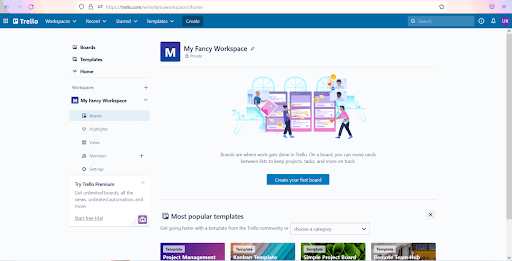
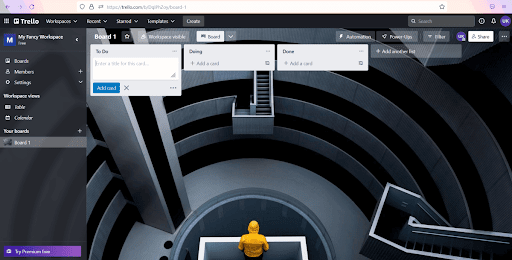
Once you sign up, a workspace allows you to set up multiple boards with either private or public views. After your board creates the workspace, you will find an empty space with the option to add lists.
Add as many lists as you want. Lists showcase individual tasks you want to manage or assign in the form of cards.
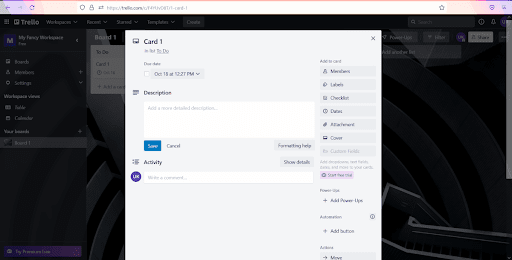
Each card in this free online collaboration tool further opens up more options. You can choose from checklists, due dates, time tracking, and labels.
Trello manages any kind of workflow. It helps track tasks over a project’s life cycle. The tool is also useful in taking care of your personal projects or managing small teams.
Features of Trello
- Up to 10 boards per free workspace with unlimited lists and cards.
- Unlimited power up features that add features to cards.
- Simple drag-and-drop kanban user interface with a custom background.
What Trello has that others don’t?
Trello’s interface provides a complete view of all the tasks in kanban. You can see all past, present, and future tasks on one page.
Pricing
There are four plans for the product.
The free online version of this collaboration tool allows you to create up to 10 boards per workspace. Each board can host unlimited cards. The version offers storage, custom backgrounds, and stickers.
There are 3 paid versions: Standard, Premium, and Enterprise.
The paid plans start at $5, billed annually. For more than 5000 users, you can contact the sales team and get a custom quote.
The paid versions include unlimited boards, custom fields, and security features. They also offer priority support.
Infolio
If basic task management is your thing then Infolio is your kind of project management tool.
This free online collaboration tool gives you a cleaner user interface with drag and drop features. Infolio enhances your workflow and collaboration on tasks without any hassle.
You can create projects and choose the privacy settings for each project on Infolio.
Infolio also lets you create private projects and choose which members of your team can view them.
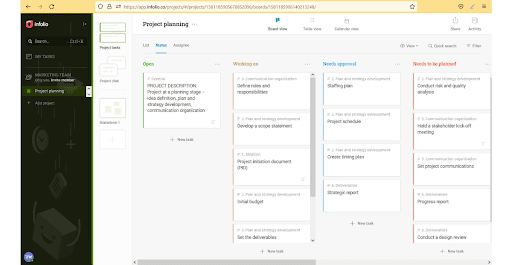
The ‘Projects’ act as folders for your ‘Tasks’. All your tasks show up in the kanban view where you can assign details and sub tasks to each task.
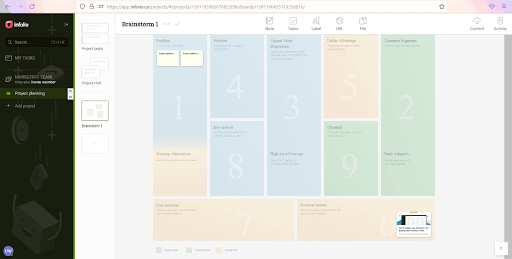
With every project you get a dedicated project chat and collaboration spaces. Team members can share files in various formats for brainstorming and visual thinking.
This online collaboration tool gives you a smooth user interface. You get to experience options available on the same level. Every option requires at most 2-3 clicks to execute.
Another unique option is ‘Spaces’. Here you can sort your files in the available templates and a free canvas.
Infolio is beneficial for small marketing and content teams, startups, freelancers, and design teams. It is ideal for your team if you rely on the visual representation of data.
Features of Infolio
- Uncomplicated design that focuses on the work process.
- Multiple project templates, views, and custom fields.
- Collaboration space with chat and task management.
What Infolio has that others don’t?
What sets Infolio apart from other free online collaboration tools is that it is pocket-friendly. But it can be a problem when it comes to productivity.
Pricing
Infolio offers an easy to understand subscription system. You can choose from two versions.
Both of these versions allow unlimited projects. Along with, team members, boards, and also spaces.
You can access all the features.
However, the paid version gives you 50 GB of space and priority support. This means you enjoy all the features even when using the free version of this online collaboration tool. But you can store only 1 GB of data without any setup fee.
The paid version currently costs $4.99/ user/month.
Basecamp
Basecamp shows you real time changes on a single page. Basecamp is home to simple views and to-do lists (tons of them). You can also find an in-built communication application.
The online collaboration tool offers complete transparency.
You can use basecamp for the following tasks:
- To manage projects and tasks
- Open communication with the entire team
- Store project related information on cloud
- Track time on projects and schedule work
Once you login, your workspace will show you the projects and teams you own. You can create projects or entire teams on basecamp with members overlapping in both.
Basecamp works by assigning work to to-do lists. You can put your entire task on a to-do whenever you need. You can work with sub-tasks and assign them to members within teams or projects.
This free online collaboration tool is a simple one. You’ll find to-do lists, message boards, and a good search feature. Your team can view all their assignments on a single page.
Your team members can also view others’ tasks to stay informed about deadlines.
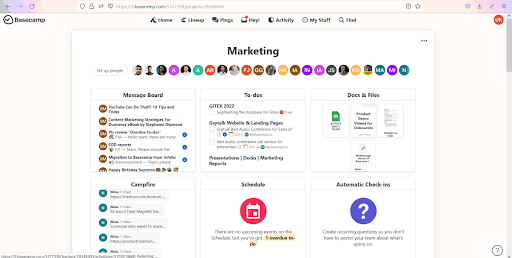
Unlike the rest, Basecamp focuses on one thing. Breaking down tasks and using internal communication tools for transparency.
Features of Basecamp
- Tracks both task and project progress.
- Facilitates communication between team members via chat and message board.
- Stores and shares relevant documents and information.
What Basecamp has that others don’t?
This simple to use online collaboration tool offers better pricing and faster support. This, too, is for the same set of features.
The hill chart feature on Basecamp shows your task progress in stages setting the pace of the project.
Pricing
Basecamp offers you one single package: $11/user/month.
For a limited time, your organisation can sign-up 3 users for free to Basecamp for 12 months.
You can access all the tool features with 500 GB storage and priority support. You also get unlimited integrations and the ability to open unlimited projects. Basecamp only charges for employees.
This means you can invite guests, contractors, and clients for free.
The tool also offers a discount for educational institutes and non-profits.
Asana
Imagine creating transparency within your small business the traditional way. Or you could do it on asana. With a user-friendly interface, asana creates an emphasis on the project manager.
As a free online collaboration tool, this application prioritises tasks.
The application offers the following:
- Tasks: This is the basic level of work definition. This is where you can define your work units and details.
- Projects: Multiple tasks makeup projects which track actionable tasks.
- Workspaces: Multiple projects make up a workspace. You can assign separate teams to separate workspaces or have one workspace with all your teams in it.
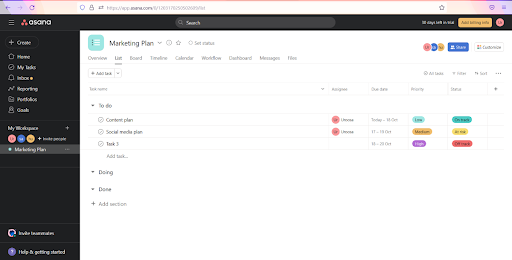
Once you sign in, you can create a new project in your workspace. You can then start assigning tasks to every member of your team.
Multiple views provide you with a clear understanding of overdue tasks.
A drag and drop feature moves your tasks across the boards to show their respective progress.
Asana is one of the oldest free online collaboration tools in the market.
Hence, the design is familiar and effortless.
Most other free online collaboration tools like ClickUp have a similar look and feel. Although they come with added or reduced functionality.
Any kind of team can use this free online collaboration tool. It is ideal for freelancers, meeting planners, and managing your remote teams.
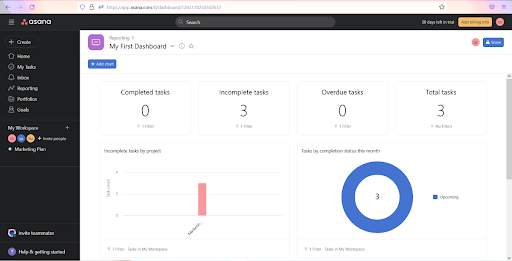
The tool helps your team members visualise their progress and stay on track.
Features of asana
- The application focuses on online collaboration and task management. It does so without tracking time.
- The application offers a wide range of integrations which covers up for any gaps you may feel.
- Unique features like video recording, duplicating tasks, and emailing to create tasks.
What asana has that others don’t?
This free online collaboration tool prioritises all of the team members. It makes work more transparent through trouble-free communication.
Pricing
Asana offers you four types of plans.
The Basic plan is free and offers you a collaboration between 15 teammates.
Similarly, you can integrate 100+ free apps with a board and list view of projects. You can create unlimited projects, unlimited messages, and unlimited file storage. All with the free version of the online collaboration tool.
The paid plans are split into 3 types: Premium, Business, and Enterprise.
The Premium version costs $10.99/user/month billed annually (or $13.49/month).
This version tops off the Basic plan offering with a workflow builder and custom fields. You can invite unlimited free guests, and get access to an admin console.
The Business version of asana has all the features of the Premium version and more. The plan costs $24.99/user/month billed annually (or $30.49/month).
In the business version, you can create portfolios of work and set goals for your company. You can also give approvals to team members, set rules on asana, and set data controls.
The business version is ideal for sales and marketing. Ideally, if any team needs to report to an executive.
You can go for the enterprise version if you need centralised management. It also helps in giving multi-level permissions.
Moreover, asana offers all the features that other plans do. Along with the added advantage of customisation.
ClickUp

You can use a separate chat app, calendar app, notes app, and many spreadsheets to keep track of your work. Or you can use ClickUp to get everything in one place.
Unlike other free online collaboration tools, ClickUp is flexible to use. The application offers you customised views with a chat option. You can also add resources with more than 30 in-built apps.
The application provides a very user-friendly interface. Once you sign-up for the free version of this online collaboration tool, you will enter the workspace. The application uses the following:
- Lists: This is the bottom level area. Here, you define individual projects or tasks for each member and assign them to members.
- Spaces: Multiple lists make up a space. Teams can work within Spaces and use multiple views to see and manipulate the work assigned to them.
- Workspace: Workspaces host multiple Spaces. You can view all the work within your organisation from here.
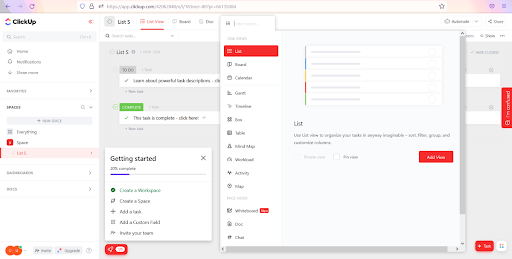
After you sign up, you enter the workspace. A sample space with a sample list is also created by default. You can take the automatic tour to set-up the tool without any hassle.
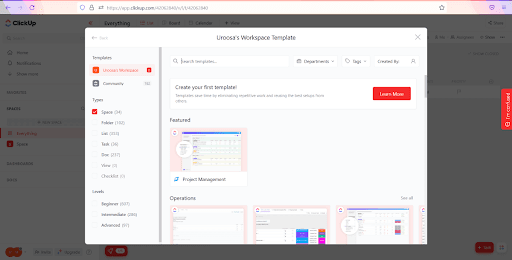
This free online collaboration tool offers multiple workspaces, spaces, and list views. These help to track time and visually represent your tasks. You can set default views, so they do not change each time your team logs into the application.
Additionally, you get multiple views open at a time. You can view progress easily with this free online collaboration tool.
You’ll find this tool to help with teams of any size and complexity. This tool is ideal for freelancers and teams. Especially teams that require continual reporting, such as marketing and strategic management.
Features of ClickUp
- Complete customisation of the workspace with third-party integrations.
- Time and task management software with 35+ built-in apps for customisation and automation.
- Real-time editing, recurring checklists, and work progress reports make collaboration a breeze.
What ClickUp has that others don’t?
You’ll get all your teams on the same application. This way, you know what each member is doing without switching the application.
ClickUp is a free online collaboration tool that allows you to create many use cases- from extremely simple to complex.
Pricing
The tool offers you 5 kinds of plans.
The free online collaboration tool offers unlimited tasks, users, and real-time chat. You also get an email facility, a kanban board, time tracking, and in-app video recording.
There are 4 paid plans: Unlimited. Business, Business Plus, and Enterprise.
The Unlimited plan offers you all the options from the Free plan plus more. You’ll find unlimited dashboards, charts, and an option to set goals and portfolios.
The Unlimited plan costs $5/member/month. It is suitable for small businesses.
The Business plan costs $12/member/month. The plan is suitable for mid-sized teams.
It offers you unlimited options plus Google SSO and advanced sharing. You can create an unlimited number of teams. The Business plan also offers advanced automation options and advanced dashboard features.
The business plus incorporates all business plan options and more. You can create custom permissions and roles for your team. The plan also offers priority support.
It costs $19/member/month. Business Plus is suitable for organisations with many teams.
The enterprise plan is the most elite plan offered by ClickUp. It is suitable for very large teams that need advanced permissions settings. You can activate it by contacting the sales team at ClickUp.
Wrike
Receiving unclear communication as you try to manage workflows is a nightmare. If information transparency had a name, it would be Wrike.
The free online collaboration tool streamlines workflow and boosts efficiency.
Wrike is built on four key components that help you keep track of your work progress:
- Tasks: Represents the work that needs to be done. You can break your work into sub-tasks and assign any level of detail.
- Projects: Projects house multiple tasks. The tasks have multiple attributes like due dates and stakeholders.
- Folders: Like any physical folder, these folders help organise your files. Spaces: Divides into 3 separate kinds; personal space, public space, and private space. Spaces let you manage your entire work from one dashboard.
You can use the top down approach after you sign up. Open a new folder in the space, add a project with details, and create new Tasks.
As you set up tasks with all the details, assign them to team members.
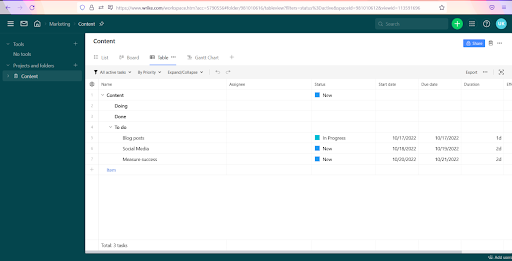
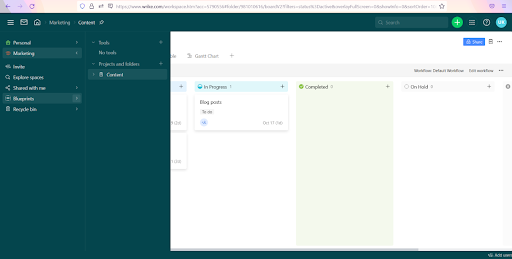
Wrike is a streamlining tool for internal collaboration on projects and processes.
You can use Wrike to manage all internal processes smoothly. Even if your team is in the same room or across the globe.
This free team collaboration software allows you to manage events, run training, and create to-do lists.
Furthermore, you can create product development lifecycles and manage projects with Wrike.
Features of Wrike
- This free online collaboration tool performs project tracking through agile.
- You view real time reports, prioritise, and schedule tasks. You can also integrate with other apps from one dashboard.
- Multi-level access and permissions create a custom solution. Use an efficient drag and drop feature to do so.
What Wrike has that others don’t?
Wrike offers customised packages for different departments. The enterprise-grade tools help manage both one-time and ongoing projects.
Pricing
Wrike offers you 5 plans.
The free online collaboration tool offers you unlimited support with limited features. You can manage tasks and create custom work views. The option also offers cloud storage; however, there is no storage space per user.
There are 4 paid plans: Professional, Business, Enterprise, and Pinnacle.
The Professional plan costs $9.80/user/month and is useful for you if your team is growing fast.
It offers all the features of the free plan and more. You can add dashboards, charts, and an option to collaborate.
The Business plan costs $24.80/user/month.
It offers you all the features from the professional plan. Plus, real time reports, project blueprint, and custom workflows. You can also create user groups, and get 5GB of storage per user.
The enterprise plan is for large teams with a custom price tag. It offers you everything. From professional plus security features to 10GB storage per user, Wrike can be a life-saver.
Toggl plan
Imagine creating worksheets and updating them every time someone sends you an update. Does that spell stress?
With toggl you can create a work management system which your entire team can use. Bonus: You can also use it to track time.
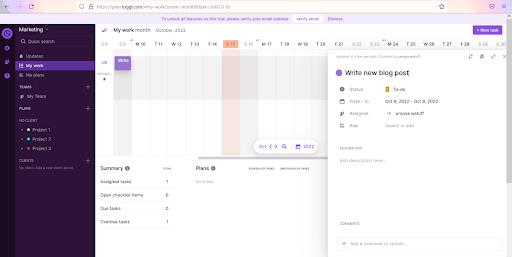
This free online collaboration tool provides a practical interface. Once you sign up for a plan, you add all your team members to the workspace and create plans for the workload.
The next step is to decide who will do what. Once all your team members are in view, you can assign timelines for each member. Do this by assigning them to specific plans.
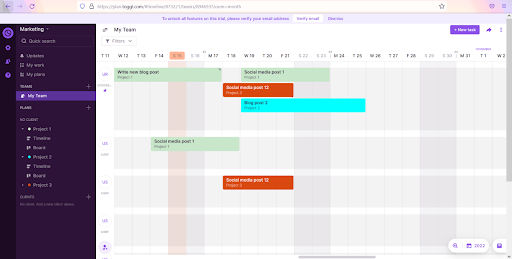
As you assign the timelines for each member, a clear overview of the total time emerges.
This tool helps you manage timelines and the progress of projects easily. All in a simple chart format. A drag and drop feature in this tool helps you assign tasks efficiently and avoid overlaps.
You can use the free version of this online collaboration tool effectively. It helps to organise tasks that need many resources at different times.
Features of toggl plan
- Timelines that help you plan your projects and track progress
- Resource planning module that helps the team and clients
- Task management and collaboration to stay on top to deliver on time
What toggl plan has that others don’t?
Toggl plan offers shared timelines for every project. The visibility of a team calendar means the entire team can view what is happening, who is working, and when.
Pricing
Toggl Plan offers you two pricing modes: Team & Business.
Both of these are monthly paid plans with a 14-day trial period.
The team plan offers you unlimited team timelines and plan boards. You can also access visual workload management, in-app, and email notifications. With 100MB of storage per file.
The team plan costs $9/user/month.
The business plan offers you everything. You get the option to export data for reports easily. And not just that, you get priority and single sign-on support too.
You can also see when the team is offline and invite guests into the workspace for collaboration.
The business plan costs $15/user/month.
Airtable
You need to know how to collaborate with people while working remotely or not. You don’t want a confusing tool that takes away the element of teamwork.
This tool centralises the database effectively.
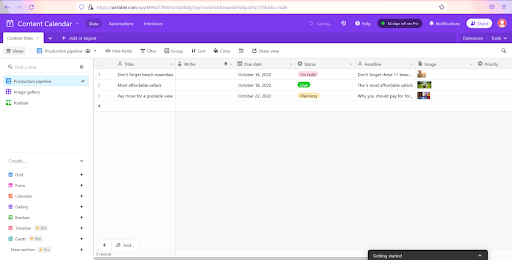
Airtable also provides you with options to create solutions to project management problems. As you open it, Airtable looks very similar to any spreadsheet software.
But guess what? That is about the only thing similar between Airtable and spreadsheets.
Airtable offers a kanban view, charts, forms, and automation.
Likewise, the tool offers you five essential components:
- Bases (from ‘databases’): Singular databases with all the information. Once you login, you can start with a blank base or build with a template.
- Tables: Tables hold one kind of information. Each Base can have multiple Tables, like a worksheet.
- Fields: Each column in a Table is a Field. In Airtable, you can customise the column types to hold a wide variety of content.
- Records: One horizontal collection of data on a table is a record. Multiple records make up the entire table.
Views: Multiple views allow the variable presentation of your data. This helps you identify problems and patterns quickly. These views include the kanban view, the headshot view, and the calendar view, among others.
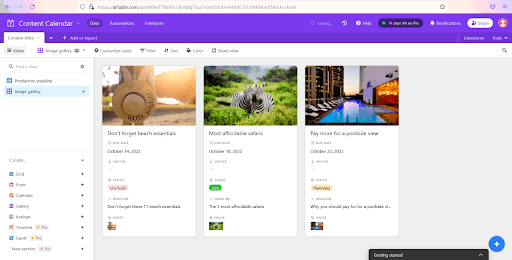
Airtable is a unique use and presentation of generic databases. Most free online collaboration tools use some kind of database on the backend. But the great part is that this tool brings it to you.
You can use Airtable for creating processes, lists, and catalogues. With the templates provided, there’s a lot you can do. This free online collaboration tool to perform a SWOT analysis and risk matrix.
Features of Airtable
- Creates mini-apps with filters and views for a structured data view
- Built-in automation enhances the results users see
- A no-code database with the power to build complex data models through linking
What does Airtable have that others don’t?
The most unique feature of Airtable is its ability to link records from one table to another.
Similarly, you get an understanding of free-flowing relationships between databases.
So now we know that airtable functions as a relational database.
Pricing
Airtable offers you four plans.
Here’s what you get in the free plan for this online collaboration tool.
You get five users, unlimited bases, 1,200 records per base, and three types of views. You can also view a two-week run history of automation.
For Airtable’s paid plans, you only pay for the rights you get.
Read-only users do not affect the pricing of the plans. You can add them in unlimited numbers to any paid version.
The software offers three paid plans: Plus, Prom, and Enterprise.
The plus plan offers you all the options from the free plan plus 5 GB of storage space per base. You also get 5000 records per base and automatic table syncing.
The plan costs $10/seat/month billed annually (or $12 billed monthly).
The pro plan costs $20/seat/month billed annually (or $24 billed monthly).
So that it comes with every option from the plus plan with the added advantage of 50,000 records per base. You also receive 20GB of attachments per base, added views, and field and table editing.
The enterprise version includes unlimited workspaces and 250,000 records per base. You also get 1,000GB of attachments per base, a 3-year revision, and a snapshot history.
You can avail the enterprise version subject to the approval of the sales team.
Your team also needs a great team communication app
So now you have an idea of which free online collaboration tools can make your team productive.
But there is just one problem.
At times even with the best collaboration software, you face poor communication issues.
This is where a simple yet effective communication app comes into play. One that improves your team’s productivity through conversations.
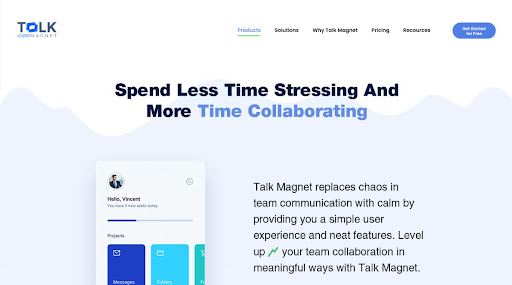
There is a solution to all your communication worries.
The answer is Talk Magnet.
Talk Magnet is hands down the most easy-to-use communication tool. It equips your team in better managing their tasks and time.
And you know what the best part is?
Talk Magnet is not tech-heavy, complicated, or exhausting. And it doesn’t come with a steep learning curve.
Talk Magnet helps you build high-spirited teams. It gives you and your team that feeling of chatting with a friend.
You also get extensive chat features, such as 1:1 chat, group chat, audio-video calls, and file sharing.
All of this with simple, secure, and fast internal communication.
So what’s the ultimate outcome of getting the best combination of a good collaboration and communication tool?
You equip your business for the future. Now, who wouldn’t want that?
Smooth collaboration and communication means productive teams
You now know the features of a great collaboration tool and the best free ones in the market.
We took it up a notch by giving you the secret to crushing your goals. Getting the perfect combination of a great collaboration tool and a communication tool.
So what are you waiting for?
Pick a collaboration app and then sign up on Talk Magnet. So your team can collaborate and communicate with ease.
No credit card needed, no hassle of a mind-boggling setup. You can learn more by scheduling a demo for Talk Magnet.