Remote work setup comes with its perks, but the struggle lies in managing a remote team and maintaining productivity.
All you need is the right approach to manage your remote team effectively.
It’s essential to consider all aspects of managing a remote team – from clear communication and setting expectations to utilising the right tools.
So, how can you ensure effective management to set your remote team up for success?
To help you navigate this new territory, we’ve compiled everything you need to know about managing a remote team successfully.
Ready? Let’s get into it.
What is a remote team?
Remote teams consist of professionals working from different time zones together on a single project.
These teammates live in different cities and come from various cultural backgrounds with diverse skills.
Remote employees collaborate and communicate with cloud-based software, documents, spreadsheets, and voice and video conferencing apps.
All of these technologies are the foundation of remote working.
For example, a data management company is mainly responsible for keeping a database.
So they won’t need employees to report to a particular location daily.
Keeping that database online allows employees to access it anywhere, anytime.
In contrast, employees of furniture-making companies must show up daily to work. They can’t work from home.
Opting for remote work may seem like the most practical choice for both your business and employees. But a remote working setup comes with its own challenges.
Yes, you read it right. Challenges.
What challenges should you expect with managing a remote team?
The first step in managing remote work is understanding what makes it so difficult.
You may face the following challenges in managing remote employees:
- Communication and collaboration: Maintaining clear and effective communication with remote team members can get challenging, especially with time zone differences, limited face-to-face interaction, and various communication tools.
- Lack of oversight and accountability: Without the ability to see employees in person, ensuring they stay on track and meet expectations is challenging.
- Isolation and loneliness: Remote workers can feel isolated from their team members and may struggle with feelings of loneliness, which can negatively affect their motivation and well-being.
- Technical issues: Technical problems like internet connectivity, software compatibility, and online security issues can disrupt the work, affecting the productivity of your team.
- Managing work-life balance: The boundary between work and personal life can become blurred for remote workers, making maintaining a healthy work-life balance challenging.
Even though handling remote employees comes with hurdles, plenty of businesses have thrived with a remote work setup. Yours could easily be one of them!
An example of a company with a great remote team
Loads of businesses have not just coped but thrived with 100% remote teams.
Below is a great example of a company with an efficient remote team. Let’s see how they manage a remote team.
Zapier

The SaaS giant Zapier has nearly 300 people in 28 different countries.
With a team across the world, Zapier is successful in achieving its remote work goals.
But how do they manage over 300 people remotely?
Zapier believes three things are essential to remote working success: team, tools, and process.
Here’s what they mean by team, tools, and process.
1. Team
The team is Zapier’s most crucial ingredient. They believe that remote work is not for everyone.
In light of this, it’s crucial to assemble a remote-capable team.
Zapier does this when hiring remote workers:
- Hire the doers.
- Hire people they can trust.
- Trust the people they employ.
- Hire people who are comfortable with not having a physical workplace.
2. Tools
You will need the right tools or software to keep everyone on the same page in a remote team.
As a rapidly growing team, Zapier found the following tools useful:
- Slack
- Async
- GitHub
- 1Password
- Coda
- Zoom
- HelloSign
- HelpScout
How can these tools help manage a remote team? That’s what “process” is about.
3. Process
Zapier thinks of the process as “how we work”.
Here are a few processes that Zapier uses to run its remote team:
- Everyone on the team contributes to customer support. This way, everyone hears the voice of the customer and contributes to making Zapier even more successful.
- Zapier keeps its product team small – usually 3 to 8 people with varying skill sets. They have three primary roles known as EPD, which stands for Engineer, Product Manager, and Designer.
- Every Thursday, they have a video gathering that changes time slots based on each week’s time zone. They have short presentations, demonstrations, and interviews during this video call.
- Zapier’s team lead sets up a recurring weekly event with each team member, and they manage to discuss how the work is going.
- Zapier believes in automating anything that can be automated.
That’s how Zapier sets up its remote team.
You, too, can take inspiration from Zapier to set up a remote team for your business.
So, how can you create a remote team?
Let’s tell you.
How to build an effective remote team
Below is a step-by-step guide to creating and managing a remote team.
Step 1: Quality onboarding is key
The lack of face-to-face interaction during onboarding of remote hiring makes it difficult for them to understand their role and fit in your company.
Ensure a quality onboarding experience by providing new hires with an onboarding deck or employee handbook.
The handbook can outline your company culture, processes, tools, and organisational structure.
The onboarding deck can also explain what the new employee can expect on their first day.
A board from the Trello team can be found for inspiration.
Step 2: Plan the perfect first day for the new hire

Ensure that your new hire starts their new job with a bang. This helps build a great culture for your remote company.
Here are some ideas to make a new hire’s first day memorable?
- Share anything from fun videos from the archives to videos about the company culture.
- Send an email with a welcome GIF.
- Say hello in the company chat. Keep the theme of “getting to know you” in mind.
- Let them settle in, but encourage them to reach out if they have doubts – this inspires trust.
They seem like little things, but they make a huge difference.
Step 3: Communicate excessively when necessary
Lack of communication in a remote environment can quickly escalate misunderstandings.
Effective communication keeps your team on the same page, whether via email, phone, or instant message.
It eliminates silos and enables remote teams—people know what to do and have everything they need to accomplish their tasks.
Now, what can you do to ensure effective communication?
It’s simple.
Don’t send vague or incomplete messages, as your team members are in different time zones.
A simple “hello” is not helpful. Send complete messages so your team members are not left guessing.
See an example of effective communication using an instant messaging app below.

Step 4: Celebrate wins

It’s challenging to appreciate how hard your team works when they’re not in front of you.
But you shouldn’t let distance demotivate your remote team.
In that case, what can you do?
You can recognise and celebrate wins regularly by highlighting employee accomplishments.
You can do it through company chat, setting aside a day and time for teams to celebrate their victories, popping a virtual bottle of bubbly, or sending gift cards to motivate your team.
Step 5: Ensure that goals, tasks, and results are transparent
Transparency concerning goals, tasks, and results is essential for any team. The results of your team’s work should be shared so members can learn from each other.
You can facilitate transparency in many ways.
For example, your company can use a collaboration board to show how projects progress.
You can also use a shared report that automatically shows everyone how close they are to achieving a specific goal.
Regardless of the tools you use, ensure your team understands what they are doing, why it matters, and how they are doing it.
Using the tips mentioned above, you can build an efficient remote team. However, for amazing results, you need some software/tools.
This brings us to another crucial aspect of remote teams: effective management.
What are the tools for managing a remote team?
Here are some tools that are essential for remote teams.
1. A remote team communication tool
Excellent communication equals great collaboration.
You agree, right?
Let’s face it, emails can make work feel slower.
So, to work faster, remote teams need newer, faster communication tools.
We’re talking about instant messaging apps. Your remote team won’t have an excuse of “I missed that email”.
And there’s one instant messaging tool that hundreds of remote teams agree on – Talk Magnet.
Talk Magnet

Talk Magnet is a simple yet powerful team communication and collaboration app.
The best part?
You don’t have to worry about your remote team learning how to use Talk Magnet because it’s as easy as using any other chat app.
Talk Magnet is lightweight, easy to use, and has no steep learning curve.
Using Talk Magnet, you can instantly connect with your remote team.
Your teams can download the Talk Magnet app on their phones and also use its web versions.
It lets you share important files, hop on a quick voice or video call, and do much more – all in a single window.
2. Remote team collaboration tools

There are tons of options available for collaboration tools. We want to discuss the popular ones here: Trello, Asana, and Airtable.
Let’s discuss this further.
Asana

Like other task and project management software, Asana allows team members to organise, collaborate, plan, and execute tasks.
With it, you can overcome chaos and meet deadlines with ease.
The tool is designed to eliminate email chaos and bring all tasks together via a web-based interface.
Airtable

Using Airtable, business teams can organise and structure their data workload in spreadsheets and unify data.
This is a cloud-based collaborative data platform that you can use for storing, sharing, and manipulating data, similar to Relational Databases.
Trello

In a nutshell, Trello is a web-based, kanban-style collaboration tool. With Trello, you can organise your projects into boards.
At a glance, Trello shows you what’s being worked on, who’s working on it, and the task’s progress.
3. Tools for managing teams in different time zones
With remote management, worrying about employees located in different places is constant.
It is expected to ask, “How do I effectively manage my remote team across different time zones? ”
You can manage teams in different time zones using the following tools.
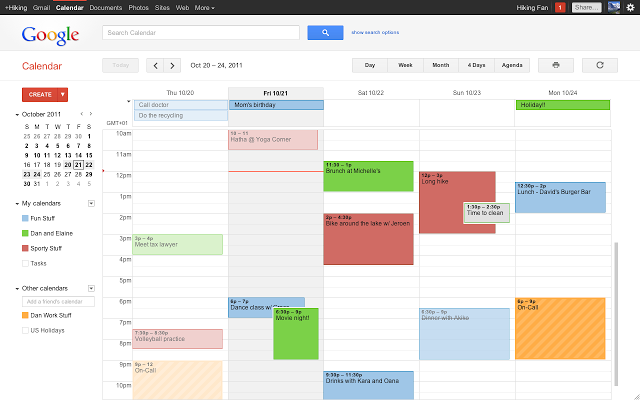
Google Calendar

There’s more to it than just a calendar.
Make your current time zone your default one, and save the time zones you use most often to switch between them easily.
The World Clock is also available in settings which display a text-based clock.
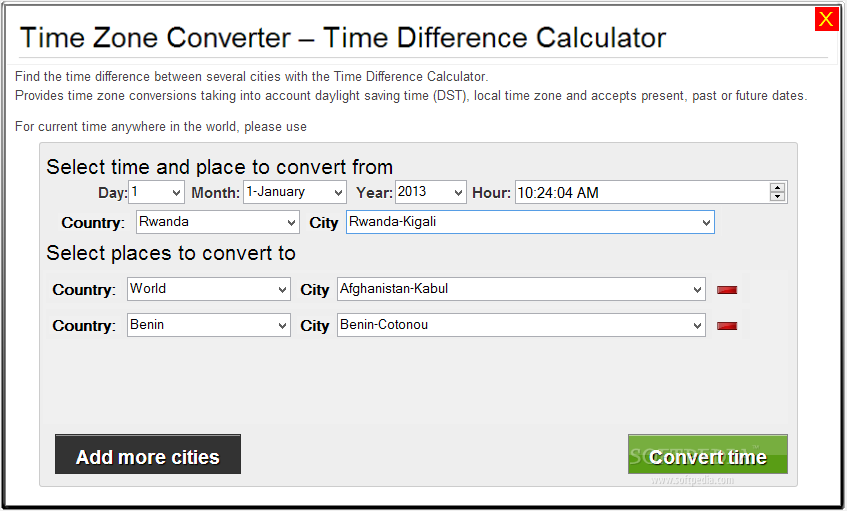
Time Zone Converter

A Time Zone Converter is just like a calculator or currency converter. The app has two clocks, one on the left and one on the right hand.
The left-hand clock always displays the local time. On the right side of the screen, you’ll see a clock showing the local time in the central city you’re entering.
For time zone emergencies and quick searches, this tool is perfect.
Timezone.io

With Timezone.io, you can keep track of the local time of your team members.
The website lets you see all the team members and their local time by putting their affiliated cities on it. It also has an intuitive user interface.
All these tools help you understand your remote employees work better. This brings us to our next point – promoting wellness in your remote team.
Here’s how you can do it.
How do you promote wellness in your remote team?
You should encourage your remote workers to stay fit and protect their mental health.
In many cases, employees report that they feel isolated from their team. In a shelter-in-place environment, employees may feel enclosed and unproductive.
Remote work is becoming more commonplace, so you need to look after employees’ mental and physical health.
What things should you consider in an employee wellness program?
Consider the following ideas:
- Host virtual after-work gatherings
- Set up a virtual social network via group chats and video chats
- Provide relevant training and resources.
- Counsel remote employees through 1:1 sessions
- Offer alternatives to in-office benefits
Maintaining employee mental health gives your organisation a strong sense of culture. And there are many other ways to build a healthy and happy environment within your remote team.
Do you want to know what other ways are to help you build a strong culture in your remote organisation? Our next section covers that.
How do you build a strong culture within your remote team?
You sense the company’s culture when you walk into a physical office. You know the company’s goals and how employees work together.
Is this possible in a remote setting? Yes, it is.
Here are some ways to foster a sense of culture among your remote employees:
- Keep your company culture updated by defining and sharing it. Defining it in a document, infographic, or slide deck is essential.
- Establish a psychologically safe, supportive, non-threatening environment where individuals feel comfortable expressing themselves.
- Make virtual onboarding comfortable for new employees.
- Communicate and collaborate with transparency.
- Ensure your employees know how much you value and appreciate their efforts.
- Provide employees with career and personal development opportunities.
- Make team bonding a priority.
- Get feedback from your employees and measure their satisfaction.
Having learned how to cultivate a robust culture within your remote team, it is time for the next step.
You need to familiarise yourself with the most effective practices for managing such a team.
What are the best practices for managing a remote team?
Here are a few essential tips for managing remote workers for business leaders:
- Define expectations and responsibilities: Establishing clear expectations and responsibilities for remote staff helps ensure everyone is working towards the same goals. This includes expected work hours, project deadlines, and communication protocols.
- Ensure open and regular communication: Regular communication helps foster a sense of connectedness and prevents misunderstandings among your team. Use daily check-ins, weekly team meetings, and communication tools like video conferencing and instant messaging.
- Provide the necessary tools and technology for remote work: Remote workers need access to the right tools, such as laptops, reliable internet access, and any specialised software or hardware required for their role.
- Encourage teamwork and collaboration: Teams that work together well are more likely to achieve their goals and deliver better results. Encourage remote workers to collaborate using tools like online project management software, virtual brainstorming sessions, and regular team-building activities.
- Foster a positive and inclusive company culture: A positive and inclusive company culture can help remote workers feel valued and motivated, even when working from home. This can be achieved through regular company-wide events, encouraging employees to share their successes and experiences, and promoting a supportive and non-judgmental environment.
Manage your remote team efficiently with Talk Magnet
With a holistic understanding of how to manage a remote team effectively, you are ready to take your business to the next level.
You can start your journey in setting up and managing a remote team by investing in the best remote collaboration and communication tools.
Talk Magnet is the best option for your remote team.
Talk Magnet’s ease of use, along with its wide range of features like file-sharing, group messaging, voice and video chats, and instant messaging, makes it the perfect choice.
So sign up for free or schedule a demo now to experience Talk Magnet yourself.