

Are you struggling to manage your global team scattered across many time zones? Well, a good team communication app for your enterprise is the answer to your worries.
A communication tool helps you build a strong and productive remote team. But we realise it isn’t easy to decide which app is the best for team communication.
This is why we will help you choose the right communication software to manage your team better.
In this article, you will learn what qualities to look for in a communication app, how to spot them, and why they are essential.
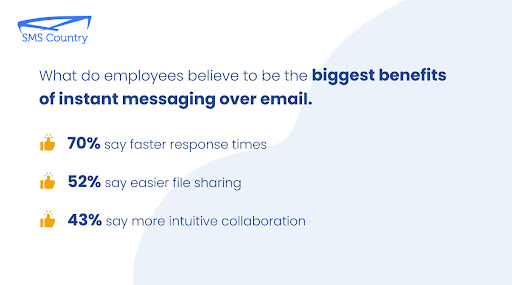
What to consider when choosing a team communication app for your enterprise
There are various tips for picking an ideal communication tool for your business. But we will share with you some practical tips to guide you in choosing the best team communication tool.
Here are the most important factors to look for in a team communication app for enterprises:
Is the app scalable?
Growth is constant for all businesses, including large enterprises. Some team communication tools adapt to this growth and handle it better than others.
You don’t want to choose an app with regular downtimes or one that cannot handle many users. Having a communication app that crashes when the load or users increase as your business grows is not ideal.
A scalable software will smoothly run whether you are a team of 1000 members or 10,000. The app will function without a drop in functionality or features.
Here is how you can find out about the scalability of a team communication app for your enterprise:
- Any team communication tool worth its price will have a free trial available. Ask your team to test the app and give feedback on how the software handles the load.
- Ask your developers to run tests on the software. You will learn a lot from workload tests and resource tests.
Can you access old messages on the app?
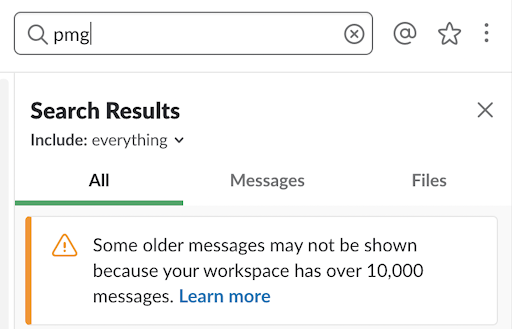
This is a key feature of a good team communication app for large enterprises.
Imagine looking for an important conversation from a few months about a project. You search for it on the app only to discover that the file or the message is not available anymore. Sounds terrible, right?
If you don’t want to get stuck in such a situation, then make sure your app saves your old conversations and files.
Check whether the communication application deletes old documents, messages, and media files. Also, see whether you can search deeply for files and conversations in the app.
Is the app highly functional and easy to use?

Your team members have varying levels of technological know-how. Avoid any tech-heavy communication app difficult to install, operate, or understand. This will only frustrate your employees and stifle communication within your organisation.
Here is what to look for in the communication app:
- Does the app offer all the features that your team needs for communication?
- Does it support various file types?
- Does the app integrate with other tools that your enterprise already uses?
- Is the application easy to install, navigate, and troubleshoot?
Conducting a usability test or requesting a demo of the app will answer all these questions for you. This will also help you see firsthand whether the team communication app fits your needs.
Is the team communication software secure?

Security in a team communication app is paramount for any enterprise. You do not want to use any team communication software with weak security. A simple security breach can expose your company to irreparable loss.
Therefore, check the documentation. Ask your legal team to find out if the communication software company is sharing data with a third party. Also, check if the team communication software ever faced a security breach in the past.
If the app clears these criteria, then only one last check remains. Get your IT administrator or a developer on your team to check the app’s code. Look for any loopholes that can get exploited in the future.
The ultimate way to ensure utmost security is by hosting the application on-premise.
Cloud or on-premise setup?

You need to find out if the communication software is cloud-hosted or on-premise.
For Cloud-hosted software, you do not need physical servers, it’s as simple as downloading and installing the app on your device.
But on-premise communication software costs more and takes longer to set up. From installation on your company’s servers to physical upgrades and maintenance afterwards.
There’s also the extra IT staff requirements cost attached, which a cloud-hosted app doesn’t need.
On the other hand, on-cloud computing gives you more flexibility to pay for what you need. You can upscale or downscale as needed. Setup and updates are easier and faster. And you can expand your operations faster without getting new servers for any new location you open.
Although on-premise software seems to have plenty of downsides. You are probably thinking “Why would anybody get on-premise software?” The answer is, that it is more secure than cloud-hosted communication software.
Ultimately, your security requirements, budget, and customer base will determine which setup you choose. Bearing this in mind, you can make an informed choice that aligns with your company’s needs.
Is dedicated support available?

Technology is unpredictable and even the best software can have bugs. Some software companies abandon you once you pay for the app until it is time to renew your subscription.
Therefore, before you pay, find out what kind of support you will get from the software company. You will definitely need to speak with the support team once in a while about the app. You should preferably get a dedicated account officer to serve your company.
Value for money

Pricing is among the most important factors when choosing a team communication tool. But beyond the cost, you should look at what the app offers and decide if it is worth the big bucks.
Check which app offers more features for less money. And which app provides more features without any hidden costs.
Yes, communication is the lifeblood of a business. But if there is an app that gives you excellent internal communication at a reduced budget, that’s a win-win.
You must check for hidden costs and loopholes in pricing. This may cause you to spend more unpredictable money in the future.
Purchasing communication software is an investment to improve your enterprise’s internal communication. And like all investments, this must yield profits.
Give your team the best team chat app
Now you know what a good communication app for large enterprises should offer. So picking a communication software should not seem daunting to you anymore.
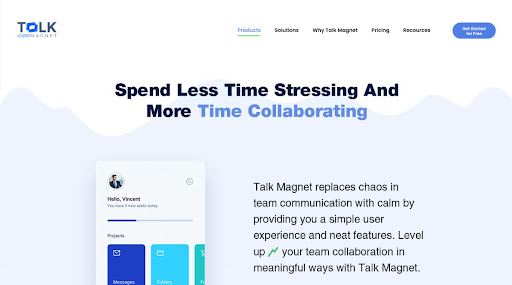
But to help you further in finding the best communication app for your enterprise, we would like to introduce you to Talk Magnet.
Talk Magnet is the ultimate team communication application for large enterprises. It excels in all the factors discussed above and boasts a 100% uptime guarantee. The best part is that you also get to choose if you want it as cloud-hosted software or on-premise. Super flexible!
Try out Talk Magnet for free and experience firsthand excellent team communication. You can also book a demo and see how easy, secure, and light it is.


