
Using WhatsApp for organisational communication is a recipe for disaster. Information easily gets lost and chats get rowdy. Is your small business facing similar problems?
The solution to your problem is to choose a team communication app made for small businesses. But with many options available to choose from, how do you decide which one is the best team chat app for your business?
We want to help you make your team productive through easy communication. This is why we tried and tested some of the best team chat apps so you don’t have to.
We also compiled a list of the best features a good team communication app should offer. After reading this article, you will know how to choose a team communication app for your small business.
What to consider when choosing a team communication app for your small business?
There are many tips for choosing the best communication tools, but we will share with you the most practical tips to guide you.
Below are the most important factors to consider in a team communication app for small businesses:
Is the team communication app scalable?
Your small business is growing each day. So you should choose an app that is scalable and grows with you. This will ensure that you don’t need to look for a new app when your team gets bigger.

Here is how you can ascertain the scalability of a team communication app for small businesses:
- Many applications offer free trial options. Before paying, ask your staff to try the app and get their feedback.
- Get your developer to run tests on the software. Workload tests and resource tests will reveal a lot about the app’s ability when it is being used by many people at the same time.
- Check how suitable the team communication app is for small businesses like yours. Look at the size of other businesses that use the communication app. See if your business fits into the group.
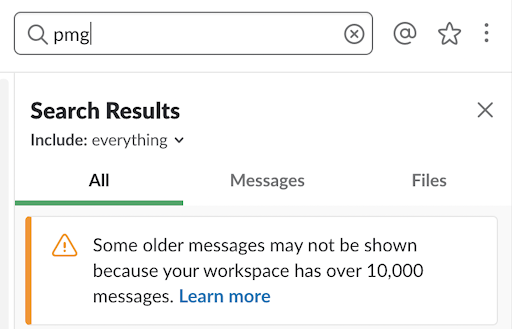
Can you access old messages?
Imagine searching for a conversation from two months ago on the app about a project. But you find out that the chat is no longer available. No one ever wants to get stuck in such a scenario.
Therefore, check if the communication application deletes old documents, messages, and media files. Also, see if you can search deeply for files and conversations in the team chat app.
This is a deciding factor in choosing a team communication app for your small business.
Is the app easy to use?
Your team members have varying levels of technological know-how. A complicated app will reduce communication and negatively impact your business. Check whether:
- The app is easy to navigate.
- Easy to Install.
- Easy to troubleshoot.
Let your team test the apps you shortlist. You can also request a demo. That way you can see firsthand how easy or difficult it is for your team to use the communication app and whether it fulfils your small business needs.

App features and integrations
Your new team communication app should “communicate” seamlessly with the tools, devices and apps that your team already works with. Also, it should have features that encourage efficient work and productivity.
Examples of features you should look out for are:
- Project/Tasks management
- File sharing (text, audio, video, files, etc)
- Audio/Video Conferencing
- Voice messaging
If the communication app does not have any of the features above, check to see if it integrates with apps that can complement those features.
Conduct a usability test to be sure about this consideration. A demo will also help in this case.

Is the app on-premise or cloud-based?
Some team communication apps are on-premise. This means that the software may be installed on your company’s private servers. And every piece of information you communicate with the app will be stored on your own servers, not on the cloud. You may also require a physical setup. This option caters more to large enterprises.
You can choose the cloud-hosted option if available. Cloud-hosted apps are less expensive, faster to implement, and require fewer IT hands.
With a cloud-hosted app, you will have more flexibility when you choose to expand your business operations.
The information about whether the app is on-premise or cloud-based is usually available on the company’s website. You can also speak with their sales team to get more information.
Based on the information you get, you can decide if that team communication app is best for your small business.

Will you get dedicated support?
No matter how great a team chat app is, you can face a few bugs every now and then while using it. It is helpful if you get access to great support.
Make sure that communication software comes with a responsive app support team to provide you assistance in case of any issues.
You can also ask for a dedicated account officer who you can always contact directly.
Also, check online review boards to know what customers are saying about the app support team.
Another easier way to get more information about the support culture of the service is to ask its users. See if you know a business that already uses the team communication app you plan on using. Ask them if they get adequate support from the company’s service team.
Multiple supported platforms
The best team communication application for your small business should work across mobile and desktop platforms. Your team should be able to communicate easily from any device they use. Check for apps that satisfy this criterion.
Some apps may be available on a particular platform/operating system but may not offer some useful features there. The software may also work with only desktops and may not be available on mobile. That is not efficient, especially for a communication app meant to increase team productivity.
So make sure you check the app’s website to see what platforms it supports.

Budget and costs
After you consider all the features, it often boils down to one factor – which app offers more for a less price. Pricing is a big deal when choosing team chat apps for a business.
Compare the pricing of different apps considering the size of your team. Take note of the payment plans. See if there are any discounts or if the payment is monthly or annually.
When you finally find an app’s plan within your budget, make sure you look for hidden costs.
Find out all the costs associated with the app before you commit. Don’t forget to keep the scalability factor of the app in mind.
Ask the support team for clarity on anything that seems unclear to you.

Choose the best to get more work done through easy communication
You must now be able to choose the perfect team communication app for your small business. With all the tips above, it should be a breeze.
But if you think it’s impossible for one app to tick all the boxes, think again. We have a great chat app suggestion for you that ticks all the boxes.
Talk Magnet is the perfect team communication application for your small business. It is scalable and unlike other tech-heavy apps, TalkMagnet is easy to install and use. Plus, whether you choose the cloud-based or on-premise option, you get 100% uptime.
And we won’t delete your old messages, retrieve them anytime you want.
Supercharge your hybrid team management, Try TalkMagnet for free today. Our team would love to show you how TalkMagnet works Request a demo now.